
The Complete Guide to the Smooth Draw Online Coloring Tool
Everything you need to know to color any page on Smooth Draw — brushes, fills, the eraser, full color palettes, saving, printing, and a guided walkthrough you can follow with your kids. No login. No download. Just open a page and color.
01Welcome
Smooth Draw turns any of our free printable pages into an interactive canvas you can color in your browser. There is nothing to install. Open a coloring page, pick a tool, pick a color, and start.
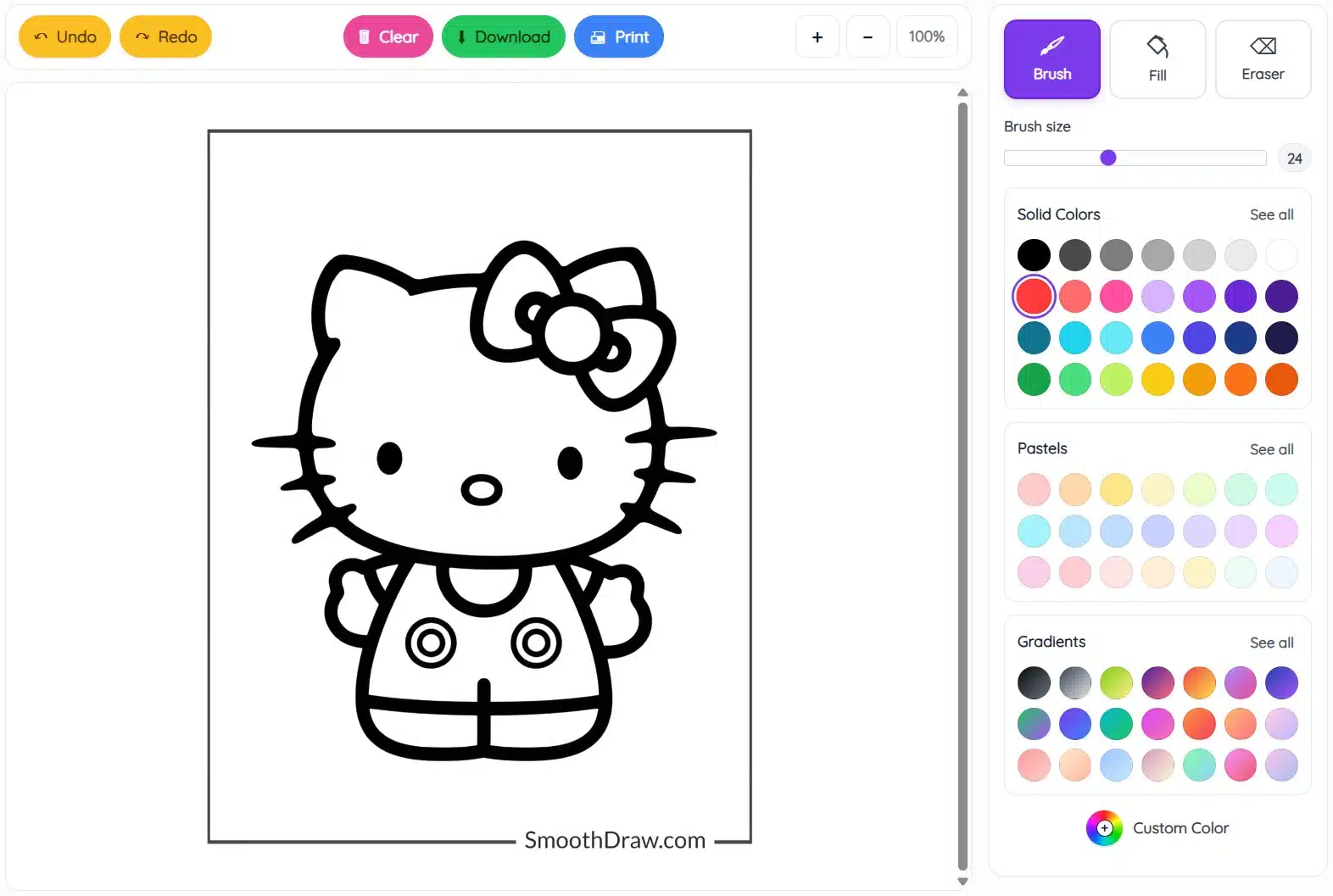
The tool has three big areas to learn:
- The toolbar across the top — Undo, Redo, Clear, Download, Print, and zoom.
- The canvas in the middle — where the line drawing lives and where you color.
- The sidebar on the right — your three drawing tools, brush size, and the full color library.
02Quick start in 30 seconds
- Pick a tool. Tap the Fill bucket on the right if you want to flood a whole region with color. Tap Brush to paint freehand strokes.
- Pick a color. Click any swatch in Solid Colors, Pastels, or Gradients. The selected swatch gets a purple ring around it.
- Click on the line drawing. With Fill, one click pours color into the closed shape you clicked. With Brush, click and drag.
Tip
Made a mistake? The big yellow Undo button at the top reverses any step — no harm done. Press it as many times as you need.
03The coloring canvas
The canvas is the white drawing area in the middle of the screen. The black line art is locked — you cannot accidentally erase or move it. Your brush strokes and fills sit on top of it, exactly the way crayon sits on top of a printed page.
Coloring outside the lines is fine. The line art will always show through over the top of any color you add.
Good to know
Each Smooth Draw page is one continuous canvas. Once you start coloring, your work stays on screen until you press Clear or close the tab. There is no auto-save — when you are happy with your art, hit Download to keep it.
04The three drawing tools
At the top of the right sidebar you will see three tool buttons. Only one is active at a time, shown by a purple background.

| Tool | What it does | Best for |
|---|---|---|
| Brush | Paints freehand wherever you click and drag. | Shading, sparkles, hair, fur, small details. |
| Fill | Pours one color into every connected pixel inside the shape you click. | Filling big areas like the dress, the bow, the background. |
| Eraser | Wipes away color you have added. Drag across to erase a path. | Cleaning up brush strokes that went outside the lines. |
Brush
The Brush is the closest thing to a real crayon. Pick it, choose a color, then click and drag inside the canvas. Let go to lift the brush.

The brush works on top of any fill, so you can add details after you have flooded the big shapes with color.
Fill (paint bucket)
The Fill tool is the fastest way to color in a finished-looking page. One click pours color into the entire connected region you clicked on.

Heads up
If you click outside the kitty (in the white space around her), Fill will flood the whole background instead of a single body part. That is normal flood-fill behavior. Press Undo and click inside the shape you meant.
Eraser
The Eraser removes any color you have added. The black line art is never affected. Use the brush size slider to make the eraser bigger when you need to wipe a large area.

05Brush size
Just below the tool buttons is the Brush size slider. Drag the dot left for a fine point, right for a fat marker. The number on the right tells you the current size in pixels.

This slider controls both the Brush and the Eraser. A small size is great for whiskers and eyes; a big size erases mistakes in one swipe.
06Color palettes
Smooth Draw ships with three curated palettes plus a free-pick color wheel — over a hundred colors in total. The currently selected color always has a purple ring around it.
Solid colors
The bold, kid-friendly classics — true black, white, every primary, and a strong rainbow. The 28 swatches you see in the sidebar are the most-used picks. Click See all to open the full palette.


Pastels
Soft, calm shades. Pastels are gentler than the solid palette and work nicely for backgrounds, skies, and skin tones.


Gradients
These swatches paint with a smooth blend of two or three colors. Pick a gradient and the brush or fill applies the whole blend in one stroke — handy for galaxy skies, rainbows, and shiny surfaces.


Custom color picker
At the bottom of the palette area is a small rainbow circle labelled Custom Color. Tap it and your device opens its native color picker — type in a hex code (like #ff7eb9), or drag the eyedropper through the spectrum to land on the exact shade you want.

Tip
The custom picker is great for matching brand colors, recreating a favorite character, or picking the same shade from one device to another.
07The top toolbar
Above the canvas is a row of colorful pill-shaped buttons. These are the actions you take on the whole drawing — not on a specific shape.

Undo & Redo (yellow)
Tap Undo to step back through your changes — every fill, every brush stroke, every erase counts as one step. Tap Redo if you went back too far. There is no limit, so you can always recover.
Clear (pink)
Wipes the canvas back to the original line drawing. Use this when you want a fresh start.
Heads up
Clear cannot be undone with a single Undo press — it removes everything. If you cleared by mistake, refresh the page only if you have not started a new drawing yet.
Download (green)
Saves your colored picture as a PNG image to your device. Great for printing later, sharing on social media, or sending to a grandparent. The file name will look like cute-hello-kitty-coloring-page.png.
Print (blue)
Sends the current canvas straight to your printer. Your browser’s print dialog opens — choose your printer, pick the paper size, and hit Print. The line art and your colors are sized to fit one page.
Tip
Want a blank page to color with crayons? Press Clear first and then Print — you will get the original line drawing without any color.
Zoom controls
The + and − buttons make the canvas bigger or smaller on screen. The percentage in the middle shows your current zoom. Zoom in for tiny details (like eyelashes); zoom out to see the whole picture before you download.
08Walkthrough: color a Hello Kitty page
A guided run through that puts every tool together. Open any Hello Kitty coloring page on Smooth Draw and follow along.
- Block in the bow. Pick the Fill tool, click a pink swatch in Solid Colors, and click on each lobe of the bow. One click per lobe.
- Color the head. Stay on Fill, switch to a soft red or pastel pink, and click anywhere inside the face outline. The whole head fills in one go.
- Dress her up. Pick a purple, then click the dress. Click each circle on the dress in a different color for a polka-dot look.
- Add details with Brush. Switch to Brush, drop the size to about 8, pick a cyan, and add tiny sparkles around the bow.
- Clean up. If a brush stroke wandered, switch to Eraser and drag across the stray mark. The line art is safe — only your color goes.
- Save your work. Hit the green Download button. The file lands in your Downloads folder, ready to send or print.
09Tips for better artwork
- Fill first, brush second. Lay down big base colors with Fill before adding details. The brush sits on top of fills, so order matters.
- Light to dark for shading. Pick a base pastel for a face or a sky, then a slightly darker shade with the brush to add shadow under the chin or near the horizon.
- Use gradients for backgrounds. A single gradient fill can make a flat background look like a sunset or a galaxy.
- Mix custom colors with presets. Match a character’s exact pink in the custom picker, then sneak in a preset for the highlights — fewer matched colors usually look more polished.
- Zoom in for the small bits. Eyes, whiskers, and noses are easier to color when they take up half the screen.
10Phones & tablets
The whole tool works with touch. The sidebar moves below the canvas on narrow screens, and every button you tap with a mouse you can also tap with a finger or a stylus.
- Brush: drag your finger across the canvas.
- Fill: a quick tap inside a shape.
- Eraser: drag across the colored area you want to clean.
- Pinch-zoom: use the on-screen +/− buttons rather than pinching the page itself, so you zoom inside the canvas instead of zooming the whole site.
Stylus owners
An Apple Pencil, Samsung S-Pen, or any third-party capacitive stylus works exactly like a finger — but with much finer control for whiskers and eyelashes.
11Troubleshooting & FAQ
I clicked Fill and the whole background turned green!
You clicked outside the shape you meant — Fill flooded all the connected white space. Press Undo (the left yellow button) and click inside the body part you wanted to color.
How do I save my colored picture?
Use the green Download button at the top. Your browser will save a PNG file to your usual Downloads folder. From there you can email it, print it, or post it.
Why does my Eraser look like it is leaving a trail?
The Eraser uses the same brush size as the Brush. If you set a small size for fine line work, the eraser will be small too. Drag the brush size slider to the right and try again.
Can I color the line art itself?
No — the black line drawing is locked. That keeps the picture looking like a coloring book even after you scribble. If you want to recolor a line, paint over it with a thick brush in the color you want.
The Print button is going to print my whole browser screen, right?
It will not — Smooth Draw sends only the canvas to the printer. Headers, ads, and the sidebar are stripped automatically. Just confirm the printer in the system dialog and your colored page comes out alone.
Is there a keyboard shortcut for Undo?
Most browsers respond to Ctrl+Z on Windows/Linux or ⌘+Z on Mac while the canvas has focus. The on-screen Undo button is always available too.
Will Smooth Draw work in Safari, Edge, Firefox?
Yes. Any modern browser from the last few years works. You do not need to install anything.
Where can I find more pages to color?
Browse the full library on the Smooth Draw coloring pages page — over a thousand free printables, all interactive.
Happy coloring! — the Smooth Draw team